

Run your Kubernetes training on real clusters
For independent trainers and training centres alike. You build a track from the catalogue or your own scenarios, open a cohort, and every trainee gets their own environment. During the session you can see who is stuck, and on which step.
From your syllabus to the classroom
The same flow for a two-hour session or a training course over several days.
- 01
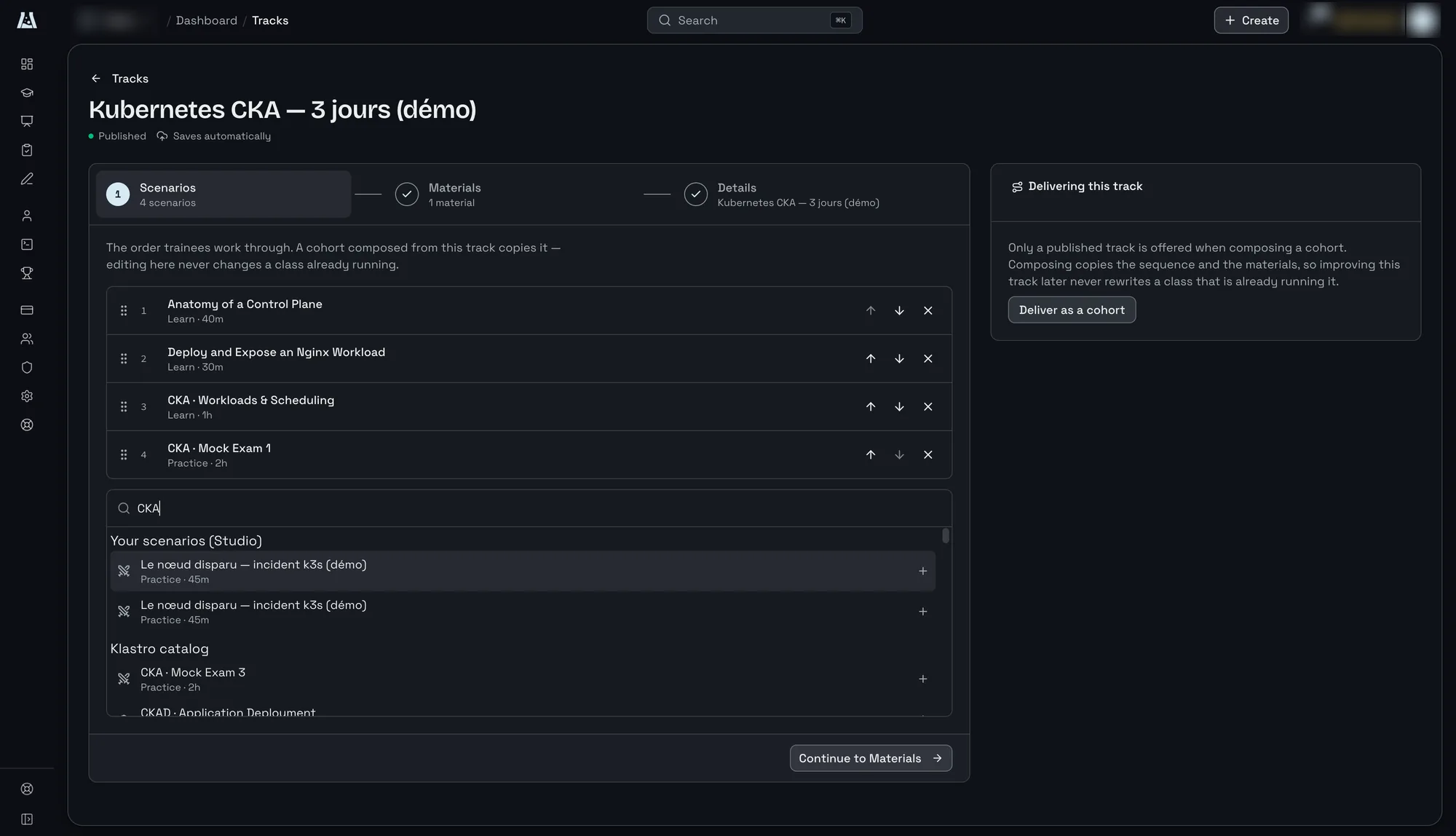
Build a track
A sequence of scenarios, from the catalogue or written by you, plus your materials. The price of one place updates live as you build it.
- 02
Open a cohort
The cohort copies the track, so you can tailor it without touching the original. Enrol members of your organization or invite an email address. Before launch, a quote breaks down the cost in credits.
- 03
Run the session
Every trainee works on their own cluster. You follow their progress task by task, they raise their hand when stuck, and you join their environment to help.
- 04
Debrief
Once the cohort has ended, results are grouped by trainee, and the class’s feedback comes with its number of responses.
During the session, you see the whole room
Built for the person running the class, not for a helpdesk that answers the next day.
Progress by task
One marker per task, in the scenario’s order, for every trainee. The third column is the third step for everyone, so you can see where the class is stuck.
Raised hand
A trainee who is stuck tells you from inside their lab. The request comes to you, the person teaching, not to a support desk.
Join an environment
You open the trainee’s terminal, read and write, to show them rather than tell them. Then you go back to the class.
Example: a demo CKA track
The “Kubernetes CKA, 3 days” track chains four catalogue scenarios and one piece of course material. Every cohort composed from it receives its own copy.
- 01
Anatomy of a Control Plane
Tutorial, 40 minutes. How the control plane’s components fit together, on a real node.
- 02
Deploy and Expose an Nginx Workload
Tutorial, 30 minutes. A first deployment, then exposing it through a service.
- 03
Workloads & Scheduling (CKA)
Tutorial, 1 hour. How workloads get scheduled, in the exam’s format.
- 04
Mock Exam 1 (CKA)
Mock exam, 2 hours. Timed tasks to close the course in real exam conditions.
On the trainees’ side
Nothing to install or configure: the course is waiting for them in their Klastro space.
My courses
Each trainee finds their cohorts in their own space, with the start date, the materials and the scenarios in the track’s order.
One lab per step
They start each scenario from the browser. A dedicated cluster comes up in seconds, and their progress feeds into your view of the class.
Help that comes from you
When they get stuck, they raise their hand from inside the lab. You see it in the list, join their terminal, then go back to the class.
Write your own scenarios
Scenario Studio, included in the Instructor plan, is where you write a scenario on a canvas: the environment, the setup steps, then the tasks and their validation rules. You preview it on a real cluster without spending credits, then publish it to use in your tracks.
Your AI agent can also write the draft for you, through Klastro’s MCP server. You review the canvas before publishing.
Available setup steps
- Helm releases and Kubernetes manifests
- Shell scripts and system packages
- Files placed on the machines
- Waiting for a condition, an HTTP call
Independent trainer or training centre?
The Instructor plan is per seat. An independent trainer takes one. A training centre assigns one to each trainer, and its admins reassign them as the team changes. Everyone works in the same organization, with the same catalogue.
Need SSO, private scenarios or concurrent lab capacity guaranteed by contract? Email us: those options belong to the enterprise offering.
Instructor plan
- €50 per seat per month, or €500 per year
- 100 credits per seat per day
- Scenario Studio: author, preview and publish
- Cohorts built from reusable tracks, 3 places included per cohort
- Give credits from your personal balance
Frequently asked questions
-
How much does a place in a cohort cost?
- Lab time is counted in credits, and a lab draws 1 to 6 credits an hour depending on the environment. The price of one place shows while you build the track, and a detailed quote comes before every cohort launch. The Instructor plan includes three places per cohort.
-
How do trainees join a cohort?
- You enrol people who are already members of your organization, or invite an email address. Each trainee then finds the course in their space and starts their labs from the browser, with nothing to install.
-
What is left after the session?
- The environments are destroyed at the end, but the results stay: you review them by trainee to prepare the debrief. The cohort’s materials stay editable, and a piece of feedback is only named if its author chose to be.
-
Can I start from existing scenarios?
- Yes. A track can mix scenarios from the catalogue, including those in the certification preparation paths, with your own scenarios written in Scenario Studio.
Prepare your next session
Klastro is in public preview. Request an invitation and tell us what you teach, or email us about a team of trainers.