

Learn Kubernetes on a real cluster, graded on its state
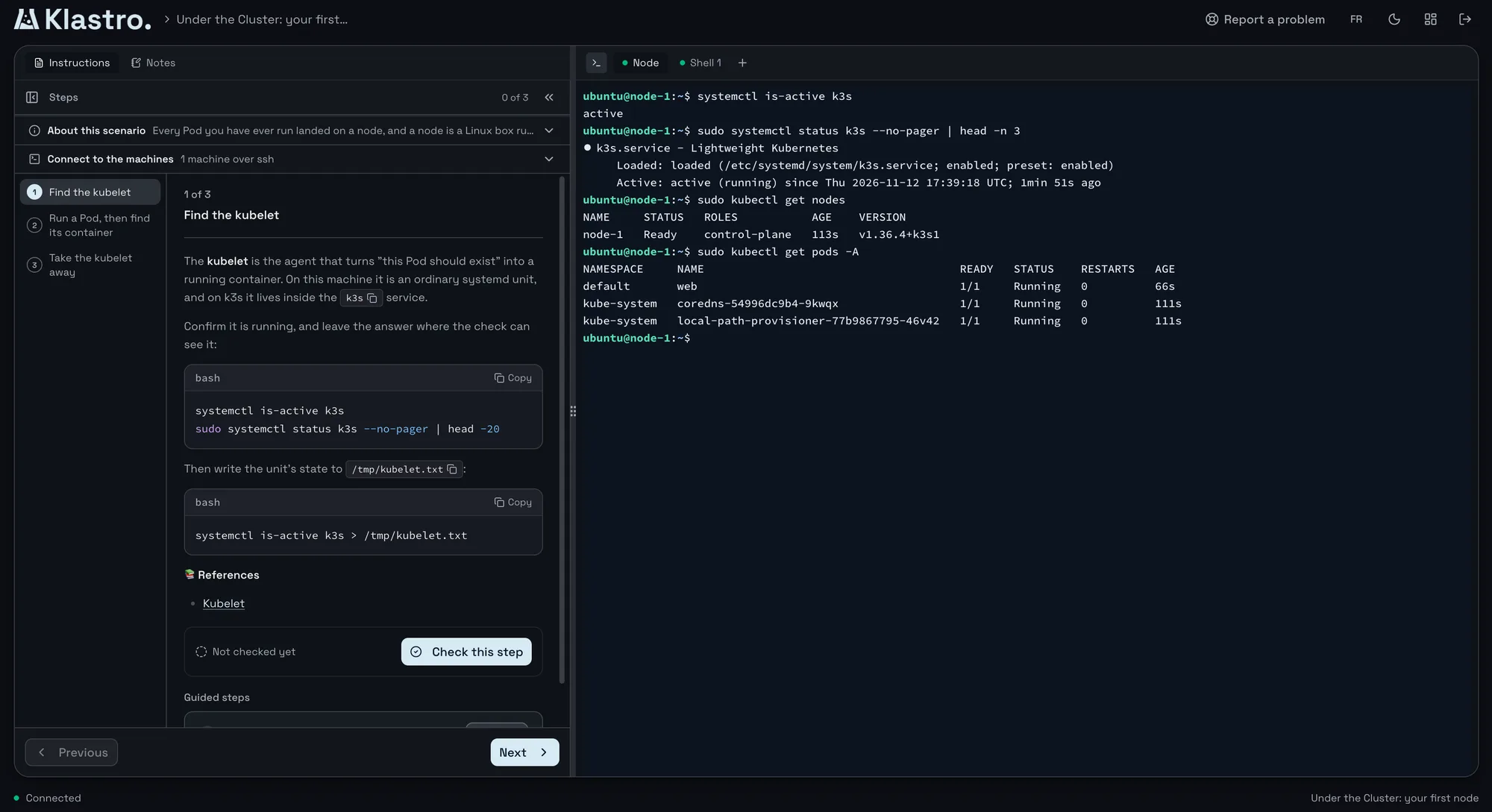
Every session starts a dedicated, isolated cluster in seconds. You work in it from the browser, root on the node when the scenario calls for it, and then validation rules read the cluster’s state to tell you what is done.
Three ways to practise
The same real cluster, presented for what you want to do.
Tutorials
A step-by-step path, with the instructions and the editor open beside the terminal, and free hints. To learn a concept without getting stuck.
Saved progress, hints with no penalty
Challenges
A fault to repair or a goal to reach. Validation rules read the cluster’s state and the score lands as soon as you submit.
Immediate score, attempt history
Playgrounds
An empty cluster with no objective. To try something out, reproduce an incident or prepare a demo without building a local environment.
No set tasks, ready in seconds
Graded on the cluster’s state, not on your commands
A lab that compares your commands with an expected answer penalises you as soon as you take another route. Klastro reads the result instead: is the deployment available, does the service answer, does the network policy block the right traffic? Any method that produces the right state passes, as it would in production.
So a failed task tells you what is missing from the cluster, not just that your answer was wrong. You fix it and submit again.
What the rules check
- A resource exists, with the right fields
- A deployment is available and its pods are ready
- A service answers, a network policy blocks what it should
- A file on the node holds the right value
Paths to prepare for your certifications
Each path follows its certification’s domains, module by module, on real clusters or a real Linux machine, and ends with timed practice exams.
CKA
Cluster architecture, scheduling, networking, storage and troubleshooting, on real kubeadm clusters.
A troubleshooting challenge and three mock exams
CKAD
Designing, configuring, deploying, exposing and observing applications on Kubernetes.
Three mock exams
CKS
Cluster and system hardening, supply chain and runtime security, on real kubeadm clusters.
Three mock exams
KCNA
Cloud native fundamentals, from your first node to application delivery and observability.
A timed practice exam
KCSA
Kubernetes and cloud native security: fundamentals, threat modelling, component and platform security, compliance.
A practice challenge
LPIC-1 and LPIC-2
Linux administration on a real machine, from packages and the shell to the kernel, storage and network services.
Two practice exams per level
Keep the killer.sh sessions that come with the exam for the dress rehearsal. Klastro is for before and between them: learning domain by domain and retrying a challenge until you pass it.
The right cluster for each lab
The scenario chooses the environment, based on what it teaches, and you configure nothing. A vcluster is enough to work with API objects. k3s fits when the cluster is the setting. kubeadm is the choice as soon as you need the control plane, the kubelet, certificates or a node join.
Four environments out of five run on hardware-isolated microVMs, each with its own kernel. Every session has its own network space and disappears at the end.
Five environments
- vcluster: a full API server per session, the fastest to start
- k3s-single: a k3s cluster on one microVM
- k3s-cluster: a k3s server and an agent, each on its own microVM
- kubeadm-single: a real kubeadm cluster, root on the node
- kubeadm-cluster: a control plane and a worker, to drain a node or debug a failed join
Frequently asked questions
-
Is Klastro free?
- The Community plan is free: tutorials, challenges and playgrounds on the community scenarios, with 10 credits a day. Pro, at €25 per seat per month, opens every community and Pro scenario with 60 credits a day. Each plan’s allowance resets every day at midnight Paris time, with no rollover. A lab draws 1 to 6 credits an hour, and no overage is ever invoiced.
-
How long does a lab last?
- As long as you need, within your credits. Starting a lab needs one hour of its credits in your balance, a lab pauses when they run out, and paused time is not charged. You can have one running lab per scenario.
-
What is left at the end of a session?
- The cluster is destroyed, along with everything in it. Your results stay: tutorial progress, challenge scores and attempt history, and how far you are through the paths.
-
Do I need to install anything?
- No. The terminal, the editor and the instructions open in the browser. During the public preview, sign-up is by invitation.
CKA, CKAD, CKS, KCNA and KCSA are trademarks of the Linux Foundation; LPIC is a trademark of the Linux Professional Institute. Klastro is not affiliated with or endorsed by either organization. Certification logos belong to their owners and only identify the certification a path prepares for.
Start your first lab
Klastro is in public preview. Request an invitation and tell us what you want to practise.